המחזיק הטוב ביותר לאייפון לטסלה: איך לבחור את המעמד הנכון לדגם שלך
איפה אתה שם את האייפון שלך כשאתה נוהג בטסלה?
אתה יכול לשים אותו על משטח הטעינה האלחוטי או בקונסולה המרכזית, אבל אף אחת מהאפשרויות לא תמיד נותנת לך את התצוגה הטובה ביותר. אם אתה משתמש באייפון שלך לניווט, מוזיקה, שיחות או אפליקציות אחרות, ייתכן שתרצה אותו במיקום שקל יותר לראות ולהגיע אליו.
הבעיה היא שאין מחזיק אייפון אחד הטוב ביותר עבור כל בעל טסלה. חלק מהנהגים רוצים התקנה נקייה ומוסתרת. אחרים מעדיפים חיבור מהיר עם מגסייפ, טעינה אלחוטית או זווית צפייה גמישה.
דגמי טסלה גם יש להם פריסות פנימיות שונות בהתאם לדגם ולשנה. זה יכול להשפיע על היכן ניתן להתקין מחזיק טלפון ואילו עיצובים יתאימו כראוי.
המדריך הזה מסביר את הסוגים העיקריים של מחזיקי אייפון לרכבי טסלה, היתרונות וההגבלות שלהם, והמצבים שבהם כל סוג עשוי לעבוד הכי טוב. על ידי השוואת מיקומי התקנה, שיטות הרכבה, תכונות טעינה והתאמה, תוכל לעשות בחירה מושכלת יותר לפני הקנייה.

מה עושה מחזיק אייפון טוב לטסלה?
המחזיק הטוב ביותר לאייפון עבור טסלה תלוי כיצד אתה משתמש בטלפון שלך בזמן נהיגה.
אם אתה משתמש לעיתים קרובות בנווט, מחזיק הממוקם קרוב יותר לקו הראייה שלך עשוי להיות נוח יותר. אם אתה מעדיף פנים פשוטות, מחזיק מוסתר או מתקפל עשוי להיות הגיוני יותר. נהגים שלעיתים קרובות עושים נסיעות קצרות עשויים לא להזדקק למחזיק טעינה בכלל.
הנה סקירה מהירה:
|
אם אתה רוצה |
סוג לשקול |
|
הרכבה מהירה ביד אחת |
מחזיק מגסייפ |
|
טעינה בזמן נהיגה |
מחזיק טעינה אלחוטית |
|
פנים נקי |
מחזיק מוסתר או מתקפל |
|
זוויות צפייה גמישות |
מחזיק מתכוונן או מסתובב |
|
התאמה רחבה יותר למארזים |
מחזיק עם קליפ מכני |
|
התקנה פשוטה |
מחזיק לאוורור או ספציפי לרכב |
המפתח הוא לבחור על סמך הרגלי הנהיגה שלך ולא פשוט לחפש את המחזיק עם הכי הרבה תכונות.
בחר את מחזיק האייפון הנכון לדגם הטסלה שלך
לפני השוואת תכונות, ודא שהמחזיק מיועד לדגם ולשנה של הטסלה שלך.
פנימיות טסלה יכולות להשתנות בין דורות. מחזיק המיועד ללוח מחוונים, מסך או פריסת אוורור אחת עשוי לא להתאים לגרסה אחרת באותו אופן.
מחזיק אייפון לטסלה דגם 3
אם אתה מחפש מחזיק אייפון לטסלה דגם 3, התחל בבדיקת שנת הדגם המדויקת.
הדגם 3 משנת 2017–2023 והדגם 3 החדש משנת 2024+ יש להם עיצובים פנימיים שונים. זה אומר שמחזיקי לוח מחוונים, מחזיקי אוורור, מחזיקים המותקנים על המסך, ועיצובים ספציפיים לרכב אחרים עשויים להיות להם דרישות התאמה שונות.
לדוגמה, מחזיק מגנטי המותקן על לוח המחוונים עשוי לעבוד טוב עבור מודל 3 של 2017–2023, בעוד שמודל 3 היילנד של 2024+ עשוי לדרוש מחזיק המיועד לעיצוב הפנימי המעודכן שלו, כמו מחזיק טלפון לאוורור.
שקול כיצד אתה בדרך כלל משתמש באייפון שלך. מחזיק המותקן על לוח המחוונים או בצד המסך יכול לספק גישה קלה, בעוד ש מחזיק מגנטי מתקפל עשוי להיות בחירה טובה יותר אם אתה מעדיף תא נקי יותר כאשר המחזיק אינו בשימוש.
גם חשוב לחשוב על טעינה. רכבי מודל 3 עם תמיכה בטעינה אלחוטית כבר מספקים משטחי טעינה בקונסולה הקדמית עבור טלפונים תומכי Qi, כך שחלק מהנהגים עשויים להזדקק רק למחזיק פשוט כדי לשפר את הנראות ולא לפתרון טעינה נוסף.
המחזיק הטוב ביותר לאייפון עבור טסלה מודל Y
אותה גישה חלה כאשר בוחרים את המחזיק הטוב ביותר לאייפון עבור טסלה מודל Y. התחל בבדיקת שנת המודל המדויקת ועיצוב הפנים לפני שבוחרים מחזיק ספציפי לרכב.
עבור מודל Y של 2020–2024, מחזיק מגנטי המותקן על לוח המחוונים יכול לשמור על האייפון שלך קרוב לתצוגה המרכזית. עבור מודל Y ג'וניפר החדש של 2025+, חפש מחזיק המיועד במיוחד לעיצוב הפנימי המעודכן שלו, כמו מחזיק טלפון מגנטי ספציפי לרכב.
גם המיקום המועדף עליך לטלפון חשוב. חלק מהנהגים עשויים להעדיף את האייפון שלהם קרוב לתצוגה המרכזית, בעוד אחרים עשויים לרצות מיקום גבוה יותר או מתכוונן יותר לניווט. אם שמירה על תא נקי מבחינה ויזואלית חשובה יותר, מחזיק מגנטי מתקפל יכול להסתיר את עצמו כאשר אינו בשימוש.
גם חשוב לחשוב על טעינה. מודל Y כולל טעינה אלחוטית משולבת בגרסאות המתאימות, כך ששווה להחליט אם אתה זקוק לטעינה בתוך המחזיק עצמו או פשוט למקום טוב יותר לראות את האייפון שלך. אם אתה משתמש באופן קבוע בניווט בנסיעות ארוכות, מחזיק טלפון עם טעינה אלחוטית מגנטית עשוי לשלב את שתי הפונקציות במקום אחד.
קרא עוד: המחזיק הטוב ביותר לטסלה מודל Y: כיצד לבחור את המתאים ביותר
סוגי מחזיקי אייפון עבור טסלה
סוגים שונים של מחזיקי אייפון יכולים ליצור חוויות נהיגה שונות מאוד. ממחזיקים עם מגנטי וטעינה אלחוטית ועד עיצובים המותקנים על לוח המחוונים, אוורור, ומתקפלים, מחזיקי טלפון של טסלה מגיעים במגוון סגנונות. הבנת הסוגים העיקריים יכולה להקל על צמצום האפשרויות שלך.
מחזיקי אייפון מגנטיים
מחזיקי מגנטיים משתמשים בחיבור מגנטי כדי לחבר אייפון תואם או כיסוי תואם למגנטי.
היתרון הגדול ביותר שלהם הוא הנוחות. בדרך כלל תוכל לחבר או להסיר את האייפון שלך ביד אחת, מה שיכול להיות שימושי כשאתה נכנס או יוצא מהרכב.
הם גם נוטים להיראות נקיים יותר מאשר מחזיקים מסורתיים בסגנון קליפ. עם זאת, החוויה תלויה בעוצמת המגנט ובתאימות המארז. מארז עבה או לא תואם עשוי לדרוש טבעת מגנטית או הגדרה שונה.
מחזיקי MagSafe הם בחירה טובה עבור נהגים שרוצים גישה מהירה ושגרה יומית פשוטה.
קרא עוד: מחזיק טלפון מגנטי של טסלה: איך לבחור את האפשרות הטובה ביותר עבור הטסלה שלך
מחזיקים לאייפון עם טעינה אלחוטית
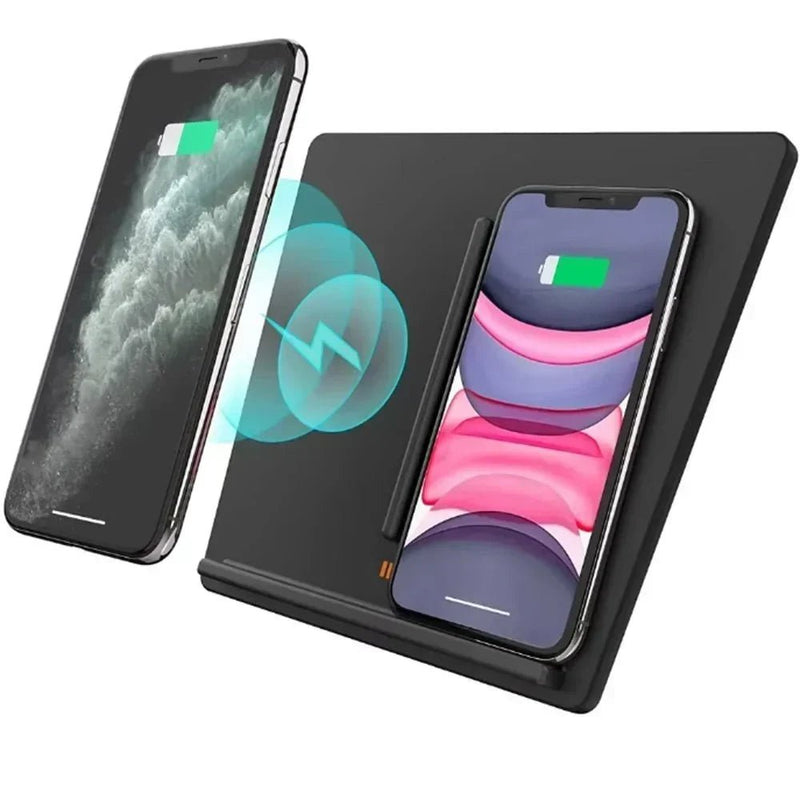
מחזיק טעינה אלחוטית משלב הרכבת טלפון וטעינה במקום אחד.
זה יכול להיות שימושי לנסיעות ארוכות או לשימוש תכוף בניווט, במיוחד אם אינך רוצה לחבר כבל בכל פעם שאתה נכנס לרכב.
עם זאת, טעינה אלחוטית אינה תמיד הכרחית. רכבי טסלה עשויים כבר לספק משטחי טעינה אינטגרליים מסוג Qi, וטעינה אלחוטית יכולה לייצר חום במהלך השימוש. טסלה גם מציינת כי מארזים עבים או ממתכת עשויים להשפיע על ביצועי הטעינה האלחוטית.
עבור כמה נהגים, מחזיק פשוט שאינו טוען יחד עם משטח הטעינה המובנה עשוי להיות מספיק.
מחזיקים לאייפון בצד לוח המחוונים ובצד המסך
מחזיקים בצד לוח המחוונים ובצד המסך ממקמים את האייפון קרוב למרכז הרכב.
מיקום זה יכול להקל על צפייה בניווט ולשמור על הטלפון בהישג יד. זה עשוי גם לעבוד היטב עבור נהגים שמשתמשים באופן קבוע ב-Apple Maps, Google Maps או אפליקציות ניווט אחרות.
המסחרה היא הראות. מחזיק ממוקם בצורה לא טובה יכול לחסום חלק מהמסך המרכזי או לגרום לפנים להיראות עמוסות יותר.
לפני שבוחרים בסוג זה, שקול את גודל האייפון שלך ואם ההתקן יכול להיות מותאם כדי להימנע מחסימת פקדי מסך חשובים.
מחזיקים לאייפון ליד פתחי האוויר
מחזיקים ליד פתחי האוויר בדרך כלל קומפקטיים ואינם תופסים הרבה מקום בלוח המחוונים.
הם יכולים להיות אפשרות טובה אם אתה רוצה שהאייפון שלך יהיה קרוב לנהג מבלי לחבר משהו ישירות ללוח המחוונים.
עם זאת, עיצובים של פתחי האוויר בטסלה משתנים לפי דגם ודור. מחזיק שנועד לפתח אוויר של רכב מסורתי עשוי לא לעבוד כראוי עם כל טסלה. בדוק את ההתאמה לפני שתבחר אחד.
גורם נוסף הוא זרימת האוויר. בהתאם למיקום ולגודל של המחזיק, הוא עשוי להשפיע חלקית על איך שהאוויר זורם מהפתח.
מחזיקים לאייפון נסתרים וקיפול
מחזיקים נסתרים וקיפול מיועדים לנהגים המעדיפים פנים טסלה נקי.
כמה עיצובים נשארים מאחורי המסך המרכזי או יכולים להתקפל כאשר הטלפון אינו בשימוש. זה מפחית את העומס הוויזואלי ויכול להפוך את ההתקן לפחות בולט.
היתרון העיקרי הוא המראה ולא הנגישות המקסימלית.
מחזיקים אלה עשויים להיות בחירה טובה אם אתה משתמש בניווט לעיתים רחוקות או פשוט לא רוצה שמחזיק טלפון יישאר גלוי כל הזמן.
מחזיקים לאייפון מתכווננים ומסתובבים
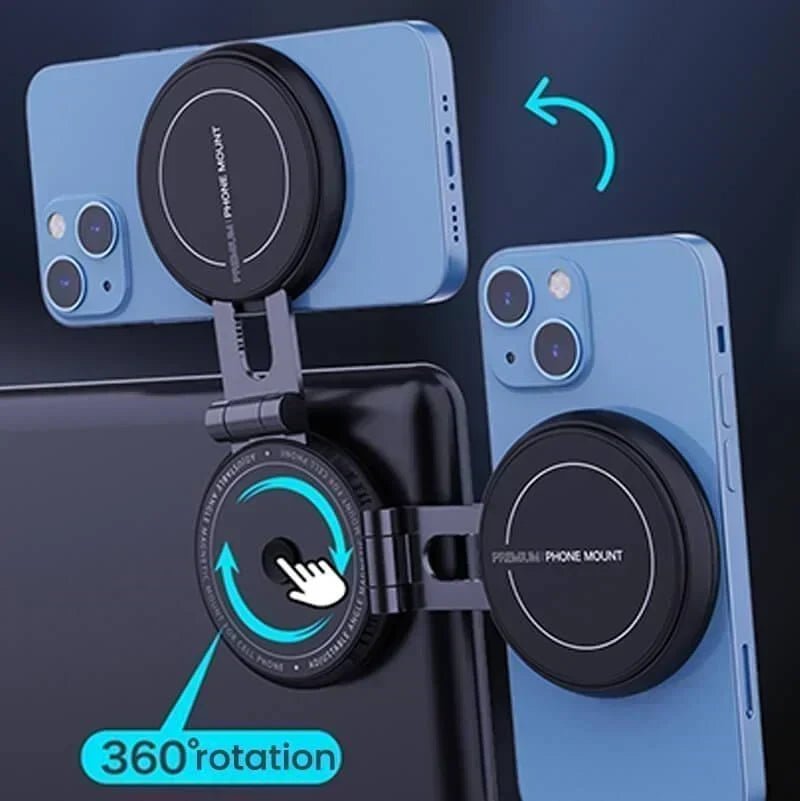
מחזיק מתכוונן או מסתובב נותן לך יותר שליטה על זווית הצפייה.
זה יכול להיות שימושי אם אתה מתחלף בין מצב פורטרט למצב נוף או משתף את הרכב עם נהגים בגבהים שונים.
ההתקנים המתכווננים יכולים גם להקל על מיקום האייפון מבלי לחסום את המסך המרכזי.
הדבר העיקרי שיש לקחת בחשבון הוא היציבות. יותר נקודות התאמה יכולות לספק יותר גמישות, אך ההתקן עדיין צריך לשמור על מיקומו במהלך נהיגה רגילה.

מה כדאי לקחת בחשבון לפני שבוחרים מחזיק אייפון לטסלה?
מחזיק אייפון טוב צריך להתאים גם לטסלה שלך וגם להרגלי הנהיגה היומיים שלך.
התאמה לדגם ושנת טסלה
תמיד בדוק קודם את דגם ושנת הטסלה שלך.
אל ת assum שהמחזיק שמסומן פשוט "לטסלה דגם 3" או "לטסלה דגם Y" יתאים לכל גרסה. שינויים במסכים, לוחות מחוונים, פתחי אוויר, וגימור פנימי יכולים להשפיע על ההתקנה.
מחזיקים ספציפיים לרכב יכולים לספק התאמה נקייה יותר, אך רק כאשר הם מיועדים לדור הנכון.
דגם האייפון שלך והמגן
ההגדרה של האייפון שלך חשובה בדיוק כמו הטסלה שלך.
אם אתה משתמש ב- אייפון תואם מגסייפ ובמגן, מחזיק מגנטי יכול לספק חיבור מהיר וקל. אם אתה משתמש במגן עבה, כדאי לבדוק אם המחזיק עדיין מספק חיבור מאובטח.
הדבר נכון גם לגבי טעינה. טסלה מציינת שמגן טלפון שהוא עבה מדי או עשוי מתכת עלול להפריע לטעינה אלחוטית.
איפה אתה רוצה שהאייפון שלך יהיה
חשוב על המקום שבו הטלפון שלך מרגיש הכי טבעי בזמן נהיגה.
מיקום על לוח המחוונים או בצד המסך יכול לספק גישה קלה. מיקום מוסתר עשוי להיראות נקי יותר. מתקן מתכוונן עשוי לעבוד טוב יותר אם אתה משתמש בניווט לעיתים קרובות ורוצה לכוונן את זווית הצפייה.
אין מיקום מושלם לכולם. המיקום הטוב ביותר תלוי בנוחות שלך, נראות, והגדרת הנהיגה המועדפת עליך.
התקנת מגסייפ מול חיבור מכני
מחזיקי מגסייפ ומחזיקי חיבור מכני מציעים יתרונות שונים.
|
מחזיק מגסייפ |
מחזיק חיבור מכני |
|
חיבור מהיר ביד אחת |
עובד עם מגוון רחב יותר של טלפונים ומגנים |
|
עיצוב נקי ופשוט |
לא תלוי בהתאמה מגנטית |
|
קל להסרה |
מספק אחיזה פיזית |
|
עובד הכי טוב עם מגנים תואמים |
עשוי לדרוש יותר מאמץ להכניס ולהסיר |
עבור רבים ממשתמשי האייפון, מגסייפ נוח לשימוש יומיומי. מחזיק חיבור עשוי להיות בחירה טובה יותר אם אתה משתמש במגן עבה מאוד או רוצה מערכת התקנה יותר אוניברסלית.
צרכי טעינה
שאל את עצמך אם אתה באמת צריך שהמחזיק שלך יטעין את האייפון שלך.
אם אתה בעיקר משתמש בטלפון לנסיעות קצרות, מחזיק שאינו טוען עשוי להיות פשוט יותר. אם אתה משתמש באופן קבוע בניווט בנסיעות ארוכות, מחזיק טוען יכול להפחית את הצורך לנהל כבלים.
עם זאת, פד הטעינה האלחוטית המובנה של טסלה עשוי כבר לענות על צרכי הטעינה שלך, בהתאם לרכב שלך ואיך אתה מעדיף למקם את הטלפון שלך.
נראות המסך ונוחות הנהיגה
מחזיק הטלפון שלך לא צריך להקשות על השימוש בפנים הטסלה.
לפני שבוחרים מיקום התקנה, חשוב אם הטלפון עלול לחסום חלק מהמסך המרכזי, להפריע לשליטה, או ליצור זווית צפייה לא נוחה.
ההרכבה שנראית טוב בתמונות מוצר לא תמיד מספקת את המיקום המעשי ביותר עבור הגובה שלך, מיקום הישיבה וגודל האייפון שלך.
המחזיק הטוב ביותר לאייפון עבור טסלה בהתבסס על איך שאתה נוהג
השגרה היומית שלך יכולה לעזור לצמצם את האפשרויות.
הטוב ביותר לנסיעות יומיות
לנסיעות יומיות, הנוחות היא בדרך כלל העדיפות.
מחזיק מגסייפ או מחזיק מתכוונן יכול להקל על חיבור האייפון שלך, לבדוק ניווט ולהסיר את הטלפון כשאתה עוזב את הרכב.
אם אתה עדיין מחליט איזה סוג של הרכבת טלפון לטסלה מתאים לסגנון הנהיגה שלך, ראה את המדריך שלנו ל המחזיק הטוב ביותר לטלפון בטסלה להשוואה רחבה יותר לפי דגם, סגנון הרכבה ומקרה שימוש.
הטוב ביותר לנסיעות ארוכות
לנסיעות ארוכות, טעינה ויציבות עשויות להיות חשובות יותר.
מחזיק טעינה אלחוטית יכול לשמור על האייפון טעון בזמן שהניווט פועל, בעוד שמחזיק מתכוונן יכול לעזור לך למצוא זווית צפייה נוחה.
הטוב ביותר לפנים נקי של טסלה
אם אתה מעדיף את הפנים המינימליסטי של טסלה, שקול מחזיק מוסתר או מתקפל.
עיצובים אלה יכולים לשמור על הרכבת הטלפון מחוץ לטווח הראייה כאשר היא לא נדרשת ולהפחית את העומס הוויזואלי הקבוע סביב לוח המחוונים.
הטוב ביותר לשימוש תכוף בנווט
נהגים שמשתמשים בנווט לעיתים קרובות עשויים להרוויח ממחזיק מתכוונן הממוקם לצפייה קלה.
חפש עיצוב יציב שמאפשר לך להתאים את הזווית מבלי לחסום את המסך המרכזי.
הטוב ביותר לנהגים שמשתמשים בכיסוי עבה לאייפון
אם אתה משתמש בכיסוי עבה, בדוק את ההתאמה בקפידה.
קליפ מכני עשוי לספק התאמה ישירה יותר, בעוד שמחזיק מגנטי צריך להיבדק או לאשר שהוא עובד עם הכיסוי. עבור טעינה אלחוטית, עובי הכיסוי יכול גם להשפיע על הביצועים.
מחזיק מגסייפ לאייפון מול מחזיק טלפון לרכב מסורתי
עבור משתמשי אייפון, אחת ההחלטות הגדולות היא האם לבחור במחזיק מגסייפ או במחזיק בסגנון קליפ מסורתי.
מגסייפ בדרך כלל מהיר ופשוט יותר. הוא מאפשר חיבור קל ביד אחת ויכול ליצור הגדרה נקייה יותר. קליפ מסורתי לא מסתמך על תאימות מגנטית ויכול לעבוד עם מגוון רחב יותר של כיסויים.
אף אחת מהאפשרויות אינה בהכרח טובה יותר.
בחר במגסייפ אם נוחות וחיבור מהיר הם העדיפויות שלך. שקול קליפ אם אתה רוצה אחיזה פיזית או משתמש בכיסוי שאינו מתאים היטב להרכבה מגנטית.
איך למצוא את מחזיק האייפון הטוב ביותר עבור טסלה שלך
לפני קבלת החלטה, שאל את עצמך ארבע שאלות פשוטות:
-
איזה דגם ושנה של טסלה אני נוהג?
-
האם אני מעדיף מגסייפ או קליפ מכני?
-
איפה אני רוצה שהאייפון שלי יהיה ממוקם?
-
האם אני צריך שהמחזיק יטעין את הטלפון שלי?
המחזיק הטוב ביותר לאייפון עבור טסלה אינו בהכרח זה עם הכי הרבה תכונות.
מחזיק פשוט עשוי להיות מספיק אם אתה רק צריך שיפור בראות. מחזיק טעינה אלחוטית עשוי להיות הגיוני יותר עבור ניווט תכוף. עיצוב מוסתר עשוי להיות האפשרות הטובה יותר אם שמירה על פנים נקי היא העדיפות שלך.
על ידי שקילת תאימות, מיקום הרכבה, צרכי טעינה והרגלי הנהיגה היומיומיים שלך, תוכל לבחור מחזיק אייפון שמתאים באופן טבעי לטסלה שלך ולא מוסיף מורכבות מיותרת.
קרא עוד: המחזיקים הטובים ביותר לטלפון עבור טסלה מודל 3: מאובטח, אלגנטי, ונבנה לכל נסיעה
שאלות נפוצות לגבי מחזיקים לאייפון עבור טסלה
מהו המחזיק הטוב ביותר לאייפון עבור טסלה?
האפשרות הטובה ביותר תלויה בדגם הטסלה שלך, בהגדרת האייפון שלך, במיקום ההתקנה המועדף ובהרגלי הנהיגה שלך. מחזיקים מגנטיים, מתכווננים, עם טעינה, ומוסתרים מתאימים לצרכים שונים.
איפה המקום הטוב ביותר להתקין אייפון בטסלה?
המיקום הטוב ביותר תלוי בזווית הצפייה המועדפת עליך. מיקומים על לוח המחוונים, בצד המסך, על פתחי האוויר, ומיקומים מוסתרים מציעים יתרונות שונים והחלפות.
האם מחזיקים מגנטיים לאייפון עובדים עם טסלה?
כן. מחזיק מגנטי יכול לשמש בטסלה אם המחזיק מיועד להתאים לרכב שלך וכיסוי האייפון או הטלפון שלך מספק תמיכה מגנטית תואמת.
האם מחזיק לאייפון יחסום את המסך של הטסלה?
זה יכול לקרות, תלוי במיקום ההתקנה ובגודל הטלפון. עיצובים מתכווננים או ספציפיים לרכב יכולים לעזור לך למקם את הטלפון כדי להפחית את החסימה של המסך.
האם אני יכול להשתמש במחזיק לאייפון עם כיסוי טלפון עבה?
כן, אבל התאימות משתנה. מחזיקים עם קליפ לרוב תומכים בכיסויים עבים יותר, בעוד שהכוח המגנטי וביצועי הטעינה האלחוטית עשויים להיות תלויים בעיצוב הכיסוי.