From the Outback to the Desert: How Starlink Cables Transform Your 4x4 Into a Mobile Office
Can you really run a business from a remote campsite? Here's what you need to know about extending your Starlink reach in the wild.
Picture this: You're parked in the middle of the Mojave Desert, red rock formations stretching to the horizon, not another human in sight. Your laptop is open on a foldable camp table, and you're joining a video call with clients in New York. No lag. No buffering. No searching for coffee shop Wi-Fi.
This isn't a fantasy. In 2026, the combination of Starlink satellite internet and a properly equipped 4x4 has turned remote wilderness into legitimate office space . But here's the catch that many overlanders discover the hard way: your Starlink dish needs a clear view of the sky, and your vehicle isn't always parked in the perfect spot.

That's where Starlink cables and extension strategies become the unsung heroes of mobile off-grid work. Let's dive into how you can set up a reliable mobile office from the world's most remote locations.
The Reality Check: Why Standard Cables Aren't Enough for Off-Grid Work
The 50-Foot Limitation
The Starlink Gen 3 system comes with a standard cable length of approximately 50 feet (15 meters) . In a suburban backyard, that's plenty. But in the backcountry? Not so much.
Here's the problem: your ideal campsite (flat ground, scenic view, away from dust) rarely aligns perfectly with the ideal Starlink dish placement (unobstructed sky view, away from trees, clear of rock formations). Without the ability to extend your cable, you're forced to choose between a comfortable camp and reliable internet.
The Power Reality
Let's be honest about something else: Starlink Gen 3 draws significant power—averaging 75-100 watts during normal use . That's more than previous generations. If you're running a laptop, charging devices, and keeping a fridge cold, your power budget gets tight fast .
The good news? With the right cable setup and power strategy, you can position your dish exactly where it needs to be while keeping your router and equipment comfortably inside your vehicle .
Key Factor 1: Understanding Your Cable Options for Maximum Reach
The Three Extension Approaches
When you need to get your Starlink dish farther from your vehicle, you have three main options. Each has its place depending on your technical comfort level and specific needs.
Official Starlink Longer Cables
Starlink offers a 150-foot cable directly through their shop. This is the simplest route for users who want guaranteed compatibility .
Pros:
-
Designed specifically for the system with proper moisture seals
-
Maintains full performance up to the recommended limit
-
No guesswork about compatibility
Cons:
-
Limited to fixed lengths
-
Higher cost than alternatives
-
May be backordered during peak seasons
Third-Purpose Replacement Cables
Many manufacturers now produce high-quality replacement cables compatible with Gen 3 dishes. Brands like VEVOR, STARGEAR, and others offer lengths from 75 feet to over 200 feet .
Look for cables featuring:
-
24AWG pure copper conductors (avoid copper-clad aluminum)
-
Waterproof and UV-resistant jackets
-
Shielding for interference reduction
User reviews confirm that quality third-party cables perform identically to OEM options at significant cost savings .
DIY Aftermarket Extensions
For hands-on overlanders, extending your existing cable with outdoor-rated Cat6 Ethernet and a waterproof coupler offers maximum flexibility .
What you'll need:
-
Outdoor-rated shielded Cat6 cable (pure copper, 24AWG or thicker)
-
IP67-rated waterproof RJ45 coupler
-
Cable management supplies
This approach works well for mid-range extensions (up to 150 feet total) and lets you create custom lengths without excess cable clutter .
The 150-Foot Rule
Here's a critical specification: the maximum recommended total cable length is around 150 feet (46 meters) . Beyond this, you risk voltage drop that can cause the dish to reboot or underperform, especially during high-demand periods like snow melt or firmware updates .
Key Factor 2: Setting Up Your Mobile Office—The Complete System
Power Infrastructure: The Foundation
Before you worry about cables, you need a power system that can sustain your digital nomad lifestyle. Based on real-world testing, here's what works :
Daily Power Budget Calculation

A typical remote work setup draws between 800 and 1600 watt-hours per day. This includes:
-
Starlink Gen 3: 75-100W continuous
-
Laptop: 30-60W while charging
-
Monitor: 20-40W
-
Lights, fridge, device charging: 50-100W
Size your lithium battery bank to two or three times your daily consumption to handle cloudy stretches without stress .
Charging Layers
Smart overlanders use three charging methods :
-
Solar panels: Rule of thumb—assume 75% efficiency and 5 hours of direct sunlight daily
-
Alternator charging: DC-DC chargers replenish batteries while driving
-
Shore power: Backup when available
Router Placement and Cable Routing
Your Starlink router needs protection from the elements. The Gen 3 router has two built-in Ethernet ports, eliminating the need for separate adapters . Consider these installation tips:
-
Mount the router in a weather-protected compartment
-
Use cable entry seals where cables pass through vehicle panels
The Workstation Itself
Don't underestimate the importance of ergonomics. An adjustable chair or seat swivel, stable desk surface, and monitor at eye level dramatically reduce fatigue during long work sessions . Add task lighting for night work and consider acoustic treatment to improve call quality .
Key Factor 3: Weatherproofing and Durability for Extreme Environments
What "Outdoor-Rated" Actually Means
When you're working from the desert or mountains, your equipment faces temperature extremes, dust, and potential moisture. Here's what to look for :
IP Ratings Explained
-
IP68: Protected against dust and continuous water immersion (unplugged)
-
IP69K: Protected against high-pressure water jets (plugged in)
The Starlink Gen 3 dish itself is rated IP68 unplugged and IP69K when connected . Your extension cables should match this durability.

Temperature Tolerance
Starlink operates from -40°C to 60°C (-40°F to 140°F) . Quality extension cables should match this range. Look for PVC jackets rated for UV resistance and cold flexibility .
Real-World Field Testing
One overlander reported their Starlink Mini hitting 150°F inside a vehicle during California summer, causing shutdowns . The lesson: even with perfect cables, thermal management matters. Position dishes with adequate airflow, and consider mounting solutions that keep the dish away from hot surfaces .
Key Factor 4: Mounting Solutions That Work With Extended Cables
Quick-Release Mounts
For overland use, permanent mounting isn't always ideal. Quick-release mounts let you deploy the dish when camped and stow it while driving. Popular options include :
-
Suction cup mounts for glass roofs (watch for overheating in direct sun)
-
Roof rack mounts with pole adapters
-
Ground stands with extension arms
Cable Management for Moving Vehicles
When you're bouncing down dirt roads, cable connections take abuse. Use these strategies :
-
Strain relief at both ends of connections
-
Coiled excess cable secured with Velcro straps
Key Factor 5: Real-World Work Scenarios and Success Stories
The Baja Beach Office
Outside Online tested a Starlink setup in Baja, Mexico, achieving 56 Mbps download speeds under overcast skies—plenty for video calls and image uploads . Their setup used a portable monitor bag to store the dish, power supply, and cables, creating a grab-and-go system.
The Tesla Model Y Mobile Office
One entrepreneur documented their quest to run a business from a Model Y using Starlink Mini . After testing dozens of cable and power combinations, they found success with:
-
100W+ cigarette lighter adapters (lower-wattage options caused shutdowns)
-
Suction cup mounts with 6-inch clearance to prevent overheating
-
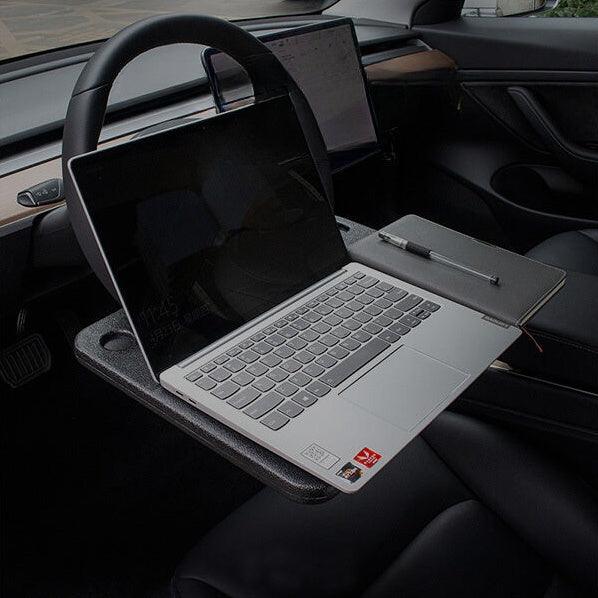
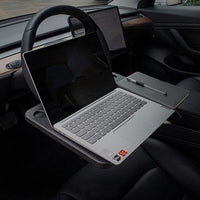
Foldable car desks for comfortable typing
The Australian Outback Rig
Australian overlanders face unique challenges: extreme heat, dust, and vast distances. The shift to RJ45 connectors on Gen 3 makes extension simpler using readily available Cat6 cable . Waterproof bulkhead connectors allow clean installations through vehicle panels without compromising weather sealing .
Practical Guide: Step-by-Step Setup for Your First Remote Work Camp
Before You Leave
-
Test everything at home: Verify your extension cable works and your power system can sustain the load
-
Create a cable kit: Include your primary cable, backup coupler, and spare connectors
-
Download offline resources: Maps, manuals, and entertainment for areas without coverage
At Camp: Deployment Sequence
-
Scout dish placement using the Starlink app's obstruction tool
-
Run your cable from dish to vehicle, avoiding pinch points
-
Connect at the vehicle end using your weatherproof entry solution
-
Power up and verify connection before settling in
Troubleshooting Common Issues
Connection drops intermittently?
-
Check all connections for secure seating
-
Verify total cable length under 150 feet
Slow speeds despite clear sky?
-
Check for obstructions you might have missed
-
Verify your Starlink plan includes your current region
-
Test during different times of day (satellite coverage varies)
Dish won't power on?
-
Measure voltage at the cable end
-
Check your power source capacity (Starlink needs steady power)

Beyond 150 Feet: What If You Need More Reach?
Sometimes your ideal campsite and ideal dish location are more than 150 feet apart. Here are advanced strategies :
Relocate the Router
Move the router and power supply closer to the dish in a weatherproof enclosure. Then run standard Ethernet from the router back to your vehicle (Ethernet can run longer distances than PoE).
Wireless Bridges
Use point-to-point wireless bridges to span gaps up to several miles. This adds complexity but solves extreme distance challenges.
Signal Boosters
For marginal extensions just beyond 150 feet, some users report success with higher-gauge cables or powered extensions, but results vary .
Conclusion: Your Mobile Office Is Within Reach
The dream of working from remote wilderness isn't just achievable—it's practical with today's technology. The Starlink Gen 3 system, paired with quality extension cables and thoughtful power management, transforms any 4x4 into a legitimate mobile office .
Here's the bottom line:
Invest in quality cables. Whether you choose official Starlink extensions or reputable third-party alternatives, don't cut corners on something that carries both data and power to your critical equipment .
Plan your power. Calculate your daily consumption, build in margin, and layer your charging sources .
Test before you need it. The first time you try extending your Starlink shouldn't be at sunset in a remote canyon with a deadline looming.
Stay flexible. Carry multiple cable lengths, spare couplers, and basic troubleshooting tools. A single grain of sand in a connector can end a workday .
The 2026 overlanding landscape offers unprecedented freedom for remote workers. With the right Starlink cable strategy, you're not just camping—you're operating a business from locations most people only see in calendars. The desert, the mountains, the remote coastline—they're all potential offices now.
Don't let a 50-foot cable limit your horizons. Extend your reach, and work from places that inspire you.