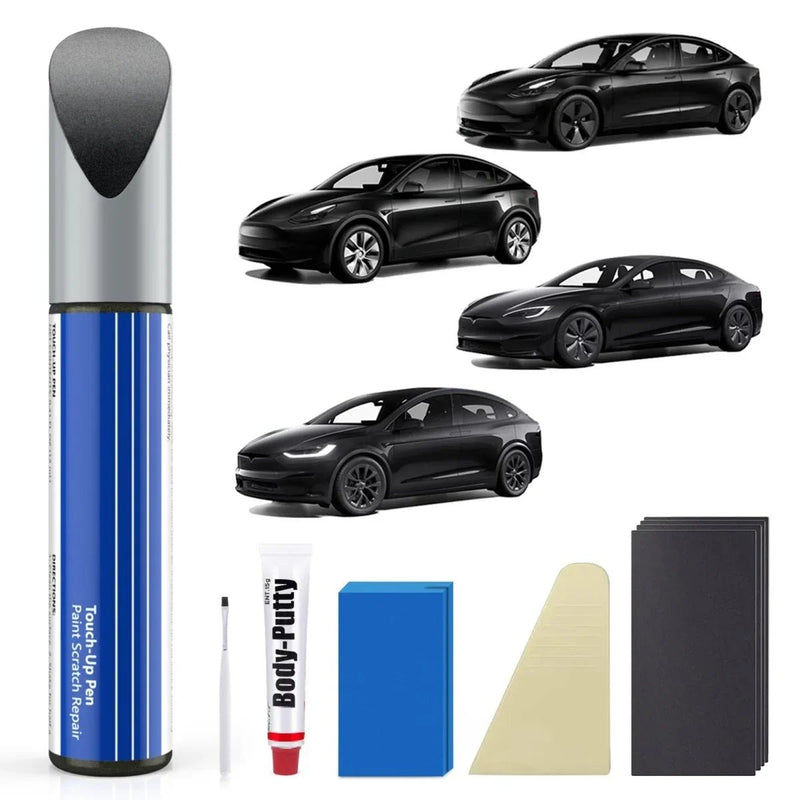

Tesla Model X Touch Up-färg: Hur man hittar rätt färg och fixar små repor
Om din Tesla Model X har en liten färgflisa eller repa, är den svåraste delen ofta inte själva reparationen. Det är att hitta rätt färg för touch-up. Model X har använt flera blå, grå, svarta, silver och röda färger genom åren, och några av dem kan se mycket lika ut på bilder.
Innan du köper färg för touch-up till Tesla Model X, hitta först din bils färgkod. När du vet koden kan du välja rätt färg och avgöra om en liten DIY-reparation är tillräcklig för skadan.
Vilka färger finns tillgängliga för Tesla Model X?
Tesla Model X har erbjudits med flera exteriörfärger, inklusive Deep Blue Metallic, Frost Blue Metallic, Midnight Silver Metallic, Pearl White Multi-Coat, Solid Black, Silver, Stealth Gray och Ultra Red. Vissa äldre Model X-fordon har också använt färger som Obsidian Black, Signature Red och Titanium Silver.
Det enklaste sättet att undvika att välja fel färg är att använda färgkoden istället för att bara förlita sig på färgnamnet.
|
Färgkod |
Tesla Färg |
Yta |
|
PBSB |
Solid Black / Bas Svart |
Solid |
|
PPSB |
Deep Blue Metallic / Ocean Blue |
Metallic |
|
PMNG |
Midnight Silver Metallic / Steel Gray |
Metallic |
|
PMSS |
Silver |
Metallic |
|
PPSW |
Pearl White Multi-Coat |
Tricoat |
|
PPMR |
Red Multi-Coat |
Tricoat |
|
PR01 |
Ultra Red |
Tricoat |
|
PN01 |
Stealth Gray |
Metallic |
|
PB00 |
Frost Blue Metallic |
Metallic |
|
PN02 |
Lunar Silver |
Metallic |
Teslas Model X-reparationsinformation listar dessa färgkoder och identifierar ytbehandlingstypen för varje färg. Samma kod kan ibland vara kopplad till mer än ett vanligt färgnamn, vilket är en anledning till att söka efter färgnamn ensam kan vara förvirrande.
Varför Tesla Model X blå färger kan vara förvirrande
Om du har en blå Model X, anta inte att varje blå touch-up-färg är utbytbar.
Till exempel, PPSB är kopplad till Deep Blue Metallic och Ocean Blue, medan PB00 är Frost Blue Metallic. De är olika färgkoder och bör inte behandlas som samma färg bara för att båda är blå.
Detta är ännu viktigare när man söker online. En fråga som "Tesla Model X blå färg" är inte specifik nog för att identifiera rätt touch-up-färg. Din bils färgkod är en mycket säkrare utgångspunkt.
Hur hittar jag min Tesla Model X färgkod?
Innan du beställer touch-up färg för Tesla Model X, kontrollera ditt fordons färgkod istället för att bara välja en färg efter namn.
Det enklaste stället att hitta den är i Bilinformation sektionen på din Model X pekskärm. Teslas serviceinformation listar fordonets färgkod som en del av fordonsdetaljerna. Den exakta menyvägen kan variera med fordonets programvaruversion.
Du kan också hitta färgkoden tryckt på en etikett fäst vid fordonet. Men platsen för denna etikett kan variera, så du behöver inte leta efter en speciell "färgkodsetikett" först.
Hur hittar jag min färgkod
-
Sätt dig i din Model X och slå på pekskärmen.
-
Öppna fordonets inställningar och leta efter Bilinformation eller Ytterligare fordonsinformation.
-
Hitta Färgkod listad i fordonsinformationen.
-
Skriv ner koden innan du beställer touch up färg.
Till exempel, PB00 används för Frost Blue Metallic, medan PPSB är kopplad till Deep Blue Metallic/Ocean Blue. Dessa är olika färgkoder, även om båda färgerna kan se blå ut.
Om du inte kan hitta färgkoden på pekskärmen, kontrollera etiketterna som är fästa vid fordonet. Platsen kan variera beroende på fordon och modellår.
Vad är färgkoden för Tesla Model X Frost Blue Metallic?
Om du letar efter Tesla Model X Frost Blue Metallic touch-up färg, är färgkoden PB00.
Tesla listar PB00 som Frost Blue Metallic med en metallisk finish i sin information om färgkoder för Model X.
Frost Blue Metallic är särskilt värt att kontrollera noggrant eftersom en blå Model X inte automatiskt är en Frost Blue Model X. Om ditt fordon visar en annan färgkod, använd den koden istället.
Denna regel gäller även andra färger. Till exempel, PPSB är Deep Blue Metallic/Ocean Blue, medan PB00 är Frost Blue Metallic.

Hur väljer jag rätt touch-up färg för Tesla Model X?
När du har färgkoden blir det mycket enklare att välja färgen.
För små karosschip och repor är en färgmatchad touch-up färgpenna användbar eftersom den låter dig applicera en liten mängd färg direkt på det skadade området. Färgpenna är vanligtvis avsedda för små chip och repor snarare än stora karossreparationer.
För Model X-ägare som letar efter en karossfärgsreparation, är Tesla Model X Kaross Touch Up Färg tillgänglig med flera Model X färgkoder, inklusive PBSB, PPSB, PMNG, PMSS, PPSW, PPMR, PR01, PN01 och PB00.
Nyckeln är inte produktformatet. Det handlar om huruvida färgen matchar koden och finishen på ditt fordon.
Touch Up Färgpenna eller Färgsats?
För en liten chip kan en penna eller liten applicator vara tillräcklig. En större reparation kan kräva ytterligare material, beroende på hur allvarlig eller bred skadan är.
En enkel sätt att tänka på det:
|
Typ av skada |
Vad som kan vara lämpligt |
|
Minimal färgflisa |
Färgreparationspenna |
|
Liten ytskada |
Färgreparationspenna |
|
Flera små flisor |
Färg eller ett litet reparationskit |
|
Djup repa genom färgen |
Mer förberedelse kan behövas |
|
Stort område utan färg |
Professionell karosserireparation kan vara bättre |
Välj inte ett kit bara för att det innehåller fler material. Bestäm först vad skadan faktiskt behöver.
Vad kostar Tesla Model X färgreparation?
Kostnaden för Tesla Model X färgreparation beror på färgtyp, mängd färg och om produkten inkluderar extra verktyg eller reparationsmaterial.
Som en allmän prisreferens kan färgreparationsprodukter för Tesla-fordon kosta mellan $17 och $40. Till exempel inkluderar T-Launch Teslas färgreparationskollektion för närvarande produkter prissatta från $16.99 till $39.99, med enkla färgpenna och mer kompletta reparationskit tillgängliga till olika prisnivåer.
Teslas egna färgreparationskit är för närvarande listat till $75. Det inkluderar en 0,5 oz flaska färg, blandningslösning, borstar, en skrapa och rengöringsdukar. Kitet är utformat för att reparera färgflisor och använder en tvåstegs färg- och blandningsprocess.
|
Alternativ |
Typisk prisintervall |
Bäst för |
|
Grundläggande färgreparationspenna |
Ungefär $17–$20 |
Små flisor och repor |
|
Färgreparationskit |
Ungefär $24–$40 |
Reparationer som behöver ytterligare applicatorer eller verktyg |
|
Tesla färgreparationskit |
$75 |
En mer komplett DIY-system för färgflisreparation |
För en mycket liten flisa eller repa kan du kanske klara dig utan ett komplett reparationskit. En färgmatchad färgreparationspenna kan vara tillräcklig för en liten reparation. Om skadan är större eller djupare kan ett kit med ytterligare applicatorer och reparationsmaterial vara mer praktiskt.
Det viktigaste steget är att matcha färgkoden innan du jämför priser. En billigare färg i fel färg kommer inte att vara en användbar reparation, medan en enkel färgpenna i rätt färg kan vara allt du behöver för en liten flisa.
Läs mer: Tesla repa reparationskostnad: Vad kostar det att fixa en repa?
Kan du använda Tesla Model X färgreparation för repor och färgflisor?
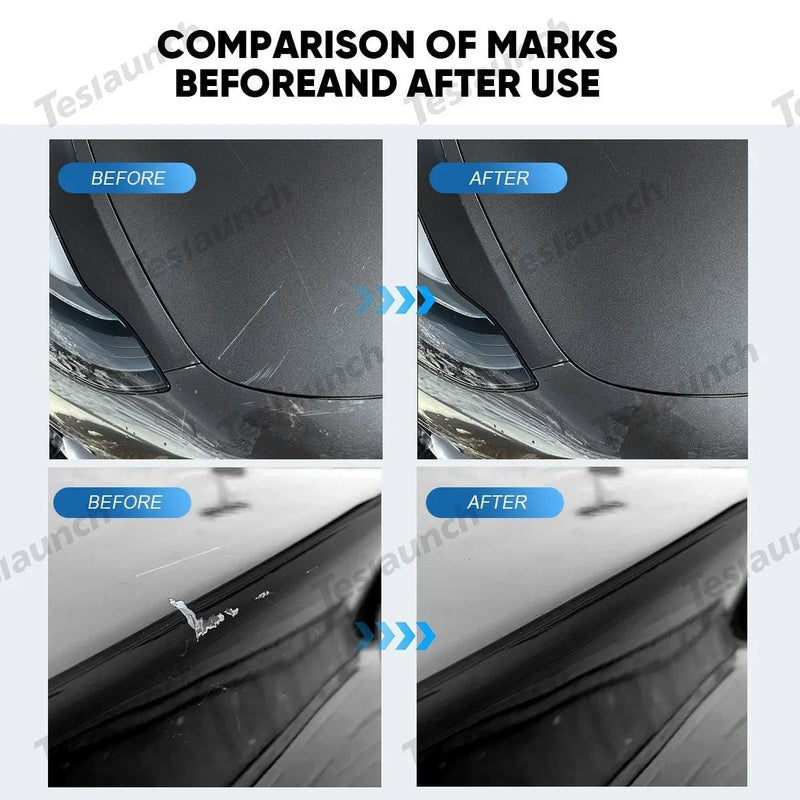
Ja, färgreparation är mest användbar för små områden där den ursprungliga färgen har flisat eller repats bort.
Det fungerar bäst när det skadade området är begränsat och den omgivande färgen fortfarande är i gott skick.
Små färgflisor
Stenskott på främre stötfångare, motorhuv, dörrar eller andra exponerade områden är vanliga kandidater för färgreparation.
Rengör området först, applicera sedan en liten mängd matchande färg istället för att försöka täcka hela den omgivande panelen.
Lätta repor
Om en repa har skadat färglagret kan touch-up färg hjälpa till att återställa färgen i det skadade området.
Men inte varje repa behöver färg. Om märket bara är på ytan och den ursprungliga färgen fortfarande är intakt kan polering eller en annan ytbearbetning vara mer lämplig.
När touch-up färg inte är tillräckligt
Touch-up färg är inte en ersättning för karossreparation.
Om du kan se betydande bar metall, om panelen är bucklig, om skadan täcker ett stort område, eller om repan har gått igenom flera lager, kan en professionell reparation ge ett bättre resultat.
Målet med touch-up färg är att göra ett litet skadat område mindre synligt, inte att återskapa en fullständig lackering på en skadad panel.
Hur man applicerar Tesla Model X touch-up färg
När du har rätt färg kan reparationen i sig vara ganska enkel för en liten chip.
Om du vill se hur reparationsprocessen ser ut innan du börjar, titta på videon nedan. Den visar hur man använder touch-up färg för att reparera en liten repa på en Tesla.
1. Rengör det skadade området
Ta bort smuts, vax och lösa material runt chipet eller repan. Ytan måste vara ren innan du applicerar färg.
En ren yta hjälper också den nya färgen att fästa ordentligt. Instruktionerna för färgpenna betonar också att förbereda och rengöra ytan innan du applicerar färg.
2. Applicera en liten mängd touch-up färg
Försök inte fylla ett stort område i ett svep.
Applicera en liten mängd färg direkt på den skadade fläcken. För en liten chip är det vanligtvis lättare att kontrollera resultatet med flera lätta appliceringar än med ett tjockt lager.
3. Låt färgen torka
Låt färgen torka enligt instruktionerna för den specifika produkten.
Undvik att röra vid eller tvätta området medan färgen fortfarande härdar.
4. Lägg till ett annat lager om det behövs
Om det skadade området fortfarande är synligt efter att det första lagret har torkat kan ett annat tunt lager hjälpa till att bygga täckning.
Detta är särskilt användbart när man reparerar en djupare chip snarare än en mycket lätt repa.
5. Använd klarlack när det behövs
Vissa touch-up färgsystem använder en separat klarlack. Om du behöver en beror på det specifika färgsystem du använder.
Till exempel beskriver AutomotiveTouchup sin färgmatchande färgpenna som en grundfärg som kräver klarlack.
Följ instruktionerna för den färg du köpte istället för att anta att varje touch-up produkt använder samma process.

Hur får du den bästa färgmatchningen på en Tesla Model X?
Det viktigaste steget sker innan du applicerar någon färg.
Använd färgkoden, inte bara färgnamnet
"Blå Model X" är inte tillräcklig information.
En bättre match är:
Model X + färgkod + matchande färg
Detta är särskilt viktigt för färger som Deep Blue Metallic och Frost Blue Metallic, som har olika koder.
Matcha den rätta finishen
Finishen spelar också roll. Teslas Model X lackinformation identifierar färger som solida, metalliska eller tricoat-finishar. Pearl White Multi-Coat och Ultra Red, till exempel, listas som tricoat-finishar, medan Solid Black är en solid finish.
Det betyder att färgmatchning inte bara handlar om att få rätt nyans. Lacksystemet och finishen påverkar också det slutliga utseendet.
Testa innan du gör en större reparation
Om du är osäker på matchningen, testa först ett litet, mindre synligt område när produktens instruktioner tillåter det.
Detta är särskilt användbart för metalliska och multi-coat-färger, där det slutliga utseendet kan förändras beroende på applicering och omgivande ljus.
För hjulskador, använd en hjulspecifik färg istället för karossfärg. En Model X hjulreparationsfärgpenna är avsedd för hjul- och navreparationer, medan karossens touch-up-färg är avsedd för exteriör karossfärg.
Slutlig checklista för Tesla Model X touch up-färg
Innan du beställer eller påbörjar en reparation, kontrollera dessa fem saker:
-
Hitta din Model X lackkod.
-
Se till att lackkoden matchar produkten.
-
Kontrollera om du reparerar karossen eller ett hjul.
-
Använd touch-up-färg främst för små chipar och repor.
-
Följ produktens instruktioner för lager, torkning och klarlack.
Om du redan känner till din lackkod men jämför olika Model 3, Model Y, Model S och Model X-färger, så erbjuder Tesla touch up-färgsamlingen de tillgängliga färgalternativen på ett ställe.
För en liten lackchip på Model X behöver processen inte vara komplicerad: identifiera koden, välj den matchande färgen, förbered det skadade området och applicera färgen i tunna lager. Att få färgen rätt är det viktigaste steget, eftersom även en noggrann reparation kan sticka ut om lackkoden är fel.