Cómo construir un espacio de trabajo móvil Tesla con energía V2L
¿Estás cansado de trabajar desde cafeterías ruidosas o de estar atado a una oficina tradicional? Con el auge del trabajo remoto y la evolución de los Vehículos Eléctricos (EVs), el sueño de un espacio de trabajo móvil y verdaderamente fuera de la red es ahora una realidad.
Mientras que algunos modelos de Tesla, como el Cybertruck, ofrecen enchufes de energía integrados, la mayoría de los propietarios de Tesla aún necesitan una solución confiable para desbloquear la salida de energía externa. Un adaptador V2L de Tesla puede convertir la batería de tu vehículo en una fuente de energía portátil para laptops, monitores, Starlink y otros equipos de trabajo. Ya seas un nómada digital, un ingeniero que visita sitios, o un creativo viajero, esta guía te mostrará exactamente cómo construir un espacio de trabajo móvil sin interrupciones alimentado completamente por tu Tesla.
¿Qué es Tesla V2L y cómo alimenta tu espacio de trabajo?
Durante años, trabajar desde un automóvil significaba agotar la pequeña batería de plomo-ácido de 12V o dejar en marcha un ruidoso motor de gasolina. Las soluciones Tesla V2L permiten a los propietarios acceder a la energía almacenada en la batería del vehículo y convertirla en energía AC utilizable para dispositivos externos.
Opciones Tesla V2L para Diferentes Modelos
Dependiendo de qué Tesla poseas, acceder a la energía V2L funciona de un par de maneras:
-
Tesla Cybertruck: El Cybertruck incluye enchufes de energía integrados a través de las características de Tesla Powershare. Sin embargo, los propietarios de Model 3, Model Y, Model S y Model X generalmente necesitan una solución V2L externa para acceder a funcionalidades similares.
-
Model 3, Model S, Model X y Model Ys más antiguos: Si tu vehículo no tiene V2L habilitado de forma nativa por Tesla, puedes usar adaptadores de descarga V2L de terceros certificados y seguros. Estos se conectan directamente a tu puerto de carga y ofrecen entre 2.0 kW y 3.6 kW de energía AC estándar.
Este nivel de energía es suficiente para equipos de oficina móviles comunes como laptops, monitores, enrutadores y otros dispositivos de baja a media potencia.
Leer más: Compatibilidad de Tesla V2L: Model Y, Cybertruck, Model 3/S/X Explicado
¿Para quién es el espacio de trabajo móvil de Tesla?
Un espacio de trabajo móvil no es solo una novedad; es una herramienta altamente funcional para varios profesionales:
-
Nómadas Digitales y Freelancers: Trabaja desde costas escénicas, parques nacionales o miradores de montaña sin preocuparte por el Wi-Fi público o los porcentajes de batería.
-
Ingenieros de Campo y Topógrafos: Ejecuta computadoras de diagnóstico, carga herramientas eléctricas e imprime documentos directamente desde el sitio de trabajo.
-
Fotógrafos y Videógrafos: Descarga metraje de drones en 4K a una laptop de escritorio y carga baterías de cine mientras estás en el lugar.
-
Agentes de Bienes Raíces y Ventas: Crea un ambiente profesional, silencioso y controlado climáticamente entre reuniones con clientes para redactar contratos y hacer llamadas.
Paso a Paso: Configurando Tu Oficina Móvil Tesla V2L
Crear un espacio de trabajo profesional requiere más que solo una laptop en tu regazo. Aquí te mostramos cómo construir una configuración práctica, ergonómica y altamente eficiente.
1. Adquisición de Energía (La Conexión V2L)
Primero, asegura tu fuente de energía.
-
Si usas un Cybertruck o un Model Y compatible, simplemente conecta tu equipo a los enchufes integrados o enchufa tu adaptador oficial de Tesla.
-
Si usas modelos anteriores, conecta tu adaptador V2L compatible al puerto de carga exterior del vehículo.
-
Ejecuta una regleta de energía de alta resistencia y protegida contra sobrecargas desde el adaptador/enchufe hacia la cabina.
2. Ergonomía y Configuración del Escritorio
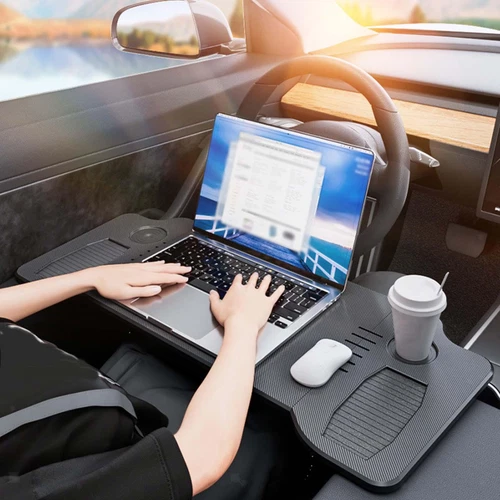
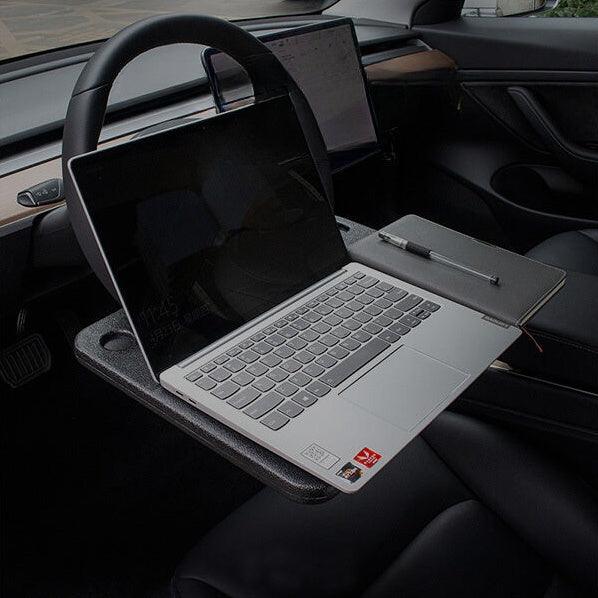
Trabajar encorvado sobre un volante arruinará tu postura. Invierte en mejoras ergonómicas:
-
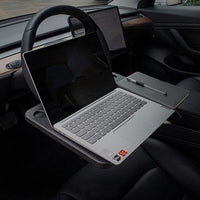
Mesas para Volante: Bandejas de madera o fibra de carbono a medida se enganchan al volante para crear un escritorio estable para tu laptop y mouse.
-
Mesas Plegables para Asientos Traseros: Si prefieres más espacio, muévete al asiento trasero y usa una bandeja plegable que se monta en los reposacabezas del asiento delantero.
-
Soportes para Laptop: Eleva tu pantalla a la altura de los ojos y usa un teclado y mouse inalámbricos.
3. Conectividad a Internet de Alta Velocidad
Un espacio de trabajo es tan bueno como su internet.
-
Starlink Mini: Perfecto para nómadas remotos. Puede ser alimentado directamente a través de los enchufes V2L de tu Tesla y montado en el techo de vidrio o en el maletero.
-
Puntos de Acceso Móviles 5G: Ideales para entornos urbanos, combinados con un amplificador de señal.
4. Gestión del Clima y el Entorno
Una de las mayores ventajas de un Tesla es Modo Campamento.
-
Modo Campamento mantiene la cabina a tu temperatura perfecta (AC o calefacción) y mantiene tus puertos USB activos sin apagar el vehículo.
-
Pantallas de Privacidad: Cortinas de malla o blackout a medida para el vidrio lateral y del techo que evitan el deslumbramiento y mantienen alejadas las miradas curiosas durante las videollamadas.
Leer Más: Cómo Usar el Adaptador Teslaunch V2L: Guía Completa de Configuración, Uso y Mantenimiento
Lista de Verificación del Equipo de Trabajo Móvil Definitivo
Aquí hay un vistazo rápido al equipo que puedes usar sin esfuerzo con el soporte V2L de Tesla:
| Categoría de Equipo | Artículo | Potencia Promedio | Compatibilidad V2L |
| Computación | MacBook Pro / Laptop | 60W - 100W | ✅ Sin esfuerzo |
| Pantalla | Monitor Portátil de 15.6" | 15W - 30W | ✅ Sin esfuerzo |
| Red | Starlink Mini / Router | 25W - 50W | ✅ Sin esfuerzo |
| Comodidad | Base de Enfriamiento para Laptop & Luz de Escritorio LED | 15W | ✅ Sin esfuerzo |
| Aparato | Hervidor de Viaje Portátil / Máquina de Espresso | 800W - 1500W | ✅ Soportado |
| Clima | Modo Campamento de Tesla (HVAC Interno) | Batería Compartida del Vehículo | ✅ Nativo |
Convierte tu Tesla en una Estación de Energía Móvil
¿Listo para construir tu espacio de trabajo móvil Tesla? El T-Launch Adaptador Tesla V2L proporciona una forma conveniente de acceder a energía AC desde la batería de tu vehículo para acampar, trabajar a distancia y aventuras al aire libre.
Leer más: Guía Tesla V2L: Cómo usarlo para acampar, emergencias y la vida diaria
Preguntas Frecuentes
¿V2L agotará la autonomía de mi Tesla?
La respuesta corta es no. Una configuración estándar de laptop consume alrededor de 100 vatios. Si trabajas durante una jornada laboral completa de 8 horas, consumes menos de 1 kWh de energía. Considerando que un Model Y tiene una capacidad de batería de alrededor de 75 kWh a 81 kWh, trabajar todo un día utiliza aproximadamente 1% a 2% de tu autonomía. Los electrodomésticos importantes como los hervidores consumen más energía, pero solo durante unos minutos a la vez.
¿Es seguro V2L para la batería de mi Tesla?
Sí. Los adaptadores Tesla y de terceros verificados operan dentro de los estrictos márgenes de seguridad del Sistema de Gestión de Batería (BMS) del vehículo. Los adaptadores de descarga V2L modernos cuentan con salvaguardias automatizadas de batería baja que se apagarán automáticamente si la batería de tu Tesla cae por debajo del 10% al 20%, asegurando que nunca te quedes varado.
¿Daño a la electrónica sensible?
Un adaptador V2L de calidad está diseñado para proporcionar una salida AC estable adecuada para electrónica sensible. Esto proporciona electricidad limpia y estable que es tan segura—si no más segura—que los enchufes de tu casa tradicional. Tus costosos laptops y equipo de cámara están completamente seguros.
¿Puede mi Tesla Model 3 o Model Y usar V2L?
La mayoría de los propietarios de Tesla Model 3 y Model Y necesitan un adaptador Tesla V2L compatible para acceder a energía AC externa. El adaptador T-Launch está diseñado para ayudar a los propietarios de Tesla a utilizar la batería de su vehículo como una fuente de energía portátil.